 Purple Orange AI

Short version: OpenAI's role-specific Codex plugins mark a real shift from AI as a generic assistant toward AI as a role-aware workflow layer. The opportunity is not better prompting. It is giving Codex enough tools, context, instructions, and playbooks to show up ready for the work.
Until recently, most people still thought of Codex as a developer tool. That framing is now too small.
On June 2, 2026, OpenAI announced role-specific Codex plugins for data analytics, product design, creative production, sales, investment banking, and public equity investing. OpenAI says the broader launch packages relevant apps, skills, instructions, and workflows, with 62 apps and 110 skills across the first set.
The interesting part is not the word "plugin." The interesting part is the playbook.
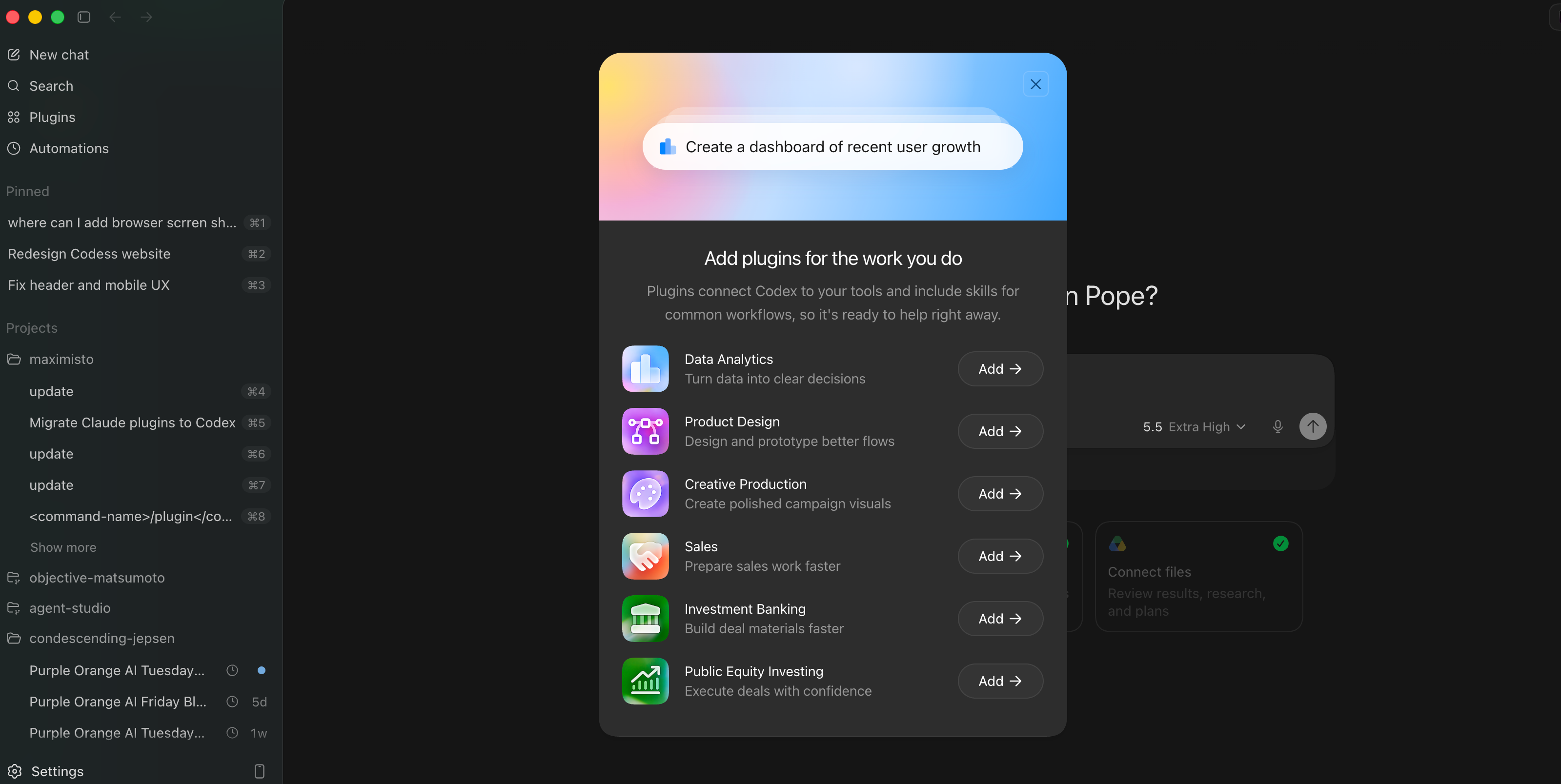
What changed with Codex plugins
Generic AI tools ask users to supply the work shape every time: the role, the tools, the process, the expected artifact, the review rules, and the next action. That works for expert users. It breaks down for teams that need repeatable outcomes.
Role-specific Codex plugins start closer to the job.
| Plugin | Work it points toward | What teams should verify |
|---|---|---|
| Data analytics | Metric investigation, dashboards, reports, and product or business data questions. | Data source access, metric definitions, row-level permissions, and chart review. |
| Product design | Flow audits, prototypes, early product directions, and interactive review artifacts. | Design system fit, product context, accessibility, and implementation handoff. |
| Creative production | Campaign boards, ad variations, product visuals, and review-ready creative assets. | Brand constraints, rights, approvals, and final production quality. |
| Sales | Account research, customer meeting prep, follow-ups, CRM updates, close plans, and risk review. | CRM write policy, customer context, human approval, and deal ownership. |
| Investment banking | Pitch materials, diligence synthesis, comparable companies, transaction analysis, and recommendations. | Source traceability, spreadsheet logic, confidentiality, and client-ready review. |
| Public equity investing | Earnings review, company comparison, signal tracking, and thesis monitoring. | Source quality, recency, assumptions, and compliance boundaries. |
This is why the launch matters for founders and operators. It is a product signal that AI adoption is moving from prompt literacy toward workflow literacy.
Why the packaging matters more than the plugin list
There are two ways to give a team AI.
The weak version is a blank chat box with permission to improvise. The team has to remember the context, describe the process, connect the tools, define the artifact, check the result, and decide what happens next.
The stronger version is a role-aware operating layer. It already knows the rough job shape. It can call the right apps. It carries instructions and skills. It knows what kind of output the team is probably asking for. It is easier to make repeatable.
That does not make the work automatic. It changes where the work begins.
The next wave of AI adoption will not come from everyone learning to prompt better. It will come from AI products understanding the work better.
What this means for operators buying AI workflows
If you are a founder, ops lead, or revenue leader, the lesson is not "install every plugin." The lesson is to stop treating AI adoption as a tools shopping exercise.
The real question is: which role-specific workflow is already expensive enough to deserve a playbook?
- Analysts: Which recurring metric questions should become reusable dashboards or investigation paths?
- Designers: Which product flows need faster prototype-review loops before engineering starts?
- Creative teams: Which campaign assets need structured variation, brand review, and production handoff?
- Sales teams: Which account research, deal prep, or follow-up workflows are eating rep time every week?
- Finance teams: Which research, diligence, comps, or client materials need source discipline and repeatable review?
This is also why we keep pushing teams to start with an AI workflow audit. The value is rarely "we added AI." The value is that one recurring piece of work becomes faster, clearer, safer, and easier to hand off.
How to adopt Codex plugins without creating AI theater
Role-aware plugins are useful only when the surrounding workflow is ready. If the process is vague, the data is messy, or no one owns review, a plugin just gives the mess a nicer interface.
1. Pick one role and one recurring workflow
Do not start with "make the whole sales team AI-native." Start with weekly account research, demo prep, campaign variation review, metric investigation, or board-report assembly.
2. Map the inputs and permissions
Identify the source systems, files, apps, and private context Codex needs. Then decide what it can read, what it can draft, and what it can write back.
3. Define the review boundary
Every serious workflow has a point where human judgment belongs. Customer-facing sends, financial claims, CRM updates, investment conclusions, and brand assets all need review until the system earns trust.
4. Measure the operational result
Track time saved, cycle time, quality of output, reduction in rework, fewer missed handoffs, or faster decision-making. Activity volume is not a business result.
If the workflow is narrow and implementation-ready, it may belong in an AI automation sprint. If it touches multiple systems, permissions, approval paths, and team handoffs, it probably needs a broader production AI infrastructure plan.
A practical deployment shape for role-aware AI
The useful pattern is simple.
- Package the workflow: define the role, apps, sources, instructions, expected artifact, and review rule.
- Run it with human review: let Codex prepare the dashboard, prototype, brief, account plan, or research pack, then have the owner approve it.
- Promote only what works: turn the reliable pieces into reusable skills, internal plugins, MCP servers, or operating docs.
That is the bridge from a public plugin directory to a production workflow inside a real company.
Find the first workflow worth packaging.
Book the free Purple Orange AI workflow audit. We will map one role-specific workflow, identify the apps and data involved, define review boundaries, and tell you whether the next move is a plugin rollout, a sprint, custom MCP infrastructure, or no build yet.
FAQ
What are Codex role-specific plugins?
They are Codex plugin bundles for specific work roles. OpenAI says they combine relevant apps, skills, instructions, and workflows so Codex can help with a defined job instead of starting from a blank prompt.
Which Codex plugins did OpenAI launch?
OpenAI announced role-specific Codex plugins for data analytics, product design, creative production, sales, investment banking, and public equity investing.
Why does this matter for non-developers?
It makes Codex more useful for analysts, designers, marketers, sales teams, investors, bankers, and operators because the product starts closer to their work and tools.
Should every team install role-specific Codex plugins immediately?
No. Start with one recurring workflow where the inputs, owner, review boundary, and expected output are clear. Then expand after the plugin proves it improves real work quality or speed.